RCForb Client
RemoteHams.comCommunication
4.287.00 Reviews
- Version
- 0.0087
- Installs
- 10.00K
- Age Rating
- Everyone
Screenshots
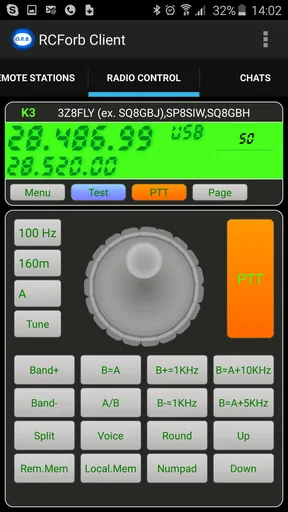
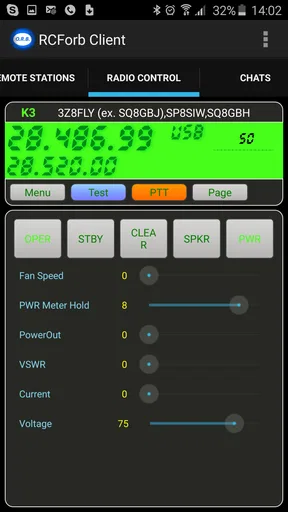
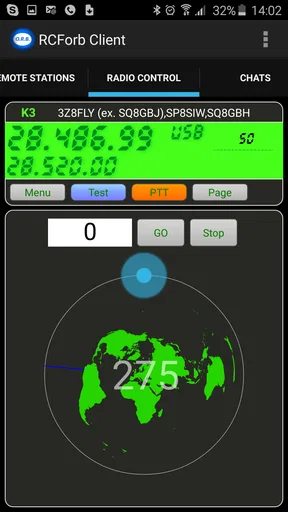
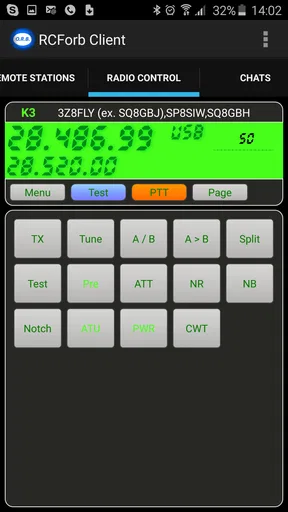
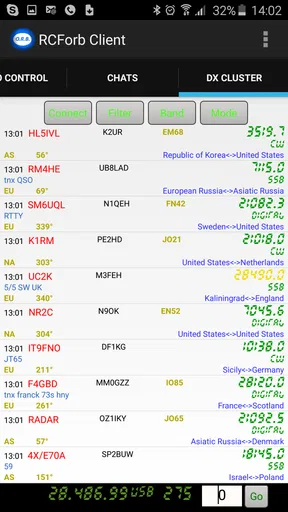
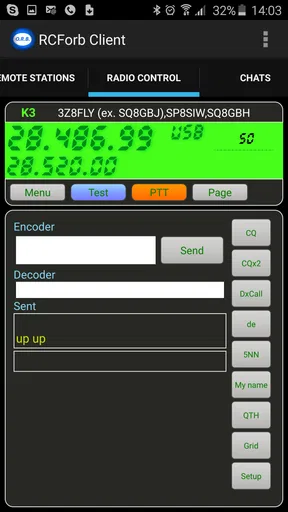
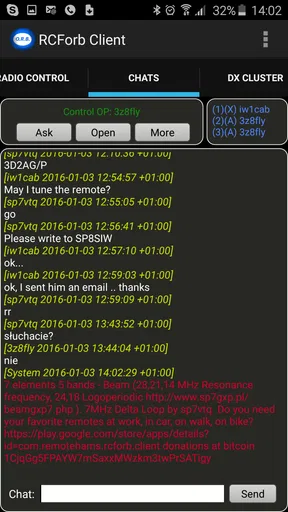
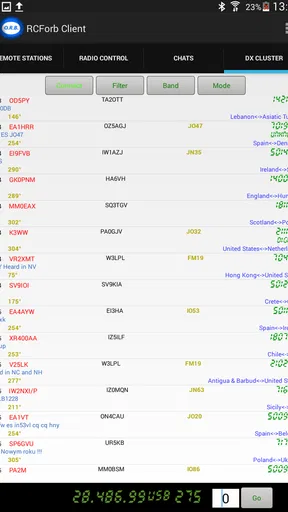
Our Review of RCForb Client
 Analysis by Appyee
Using a remote amateur-radio station from a phone is a very different experience from using a normal messaging app. I approached RCForb Client as a communication tool for shared household use, where one person may manage the radio equipment while another checks in from a phone. That distinction matters: this is not a general chat service, a social network, or a walkie-talkie replacement. It is a mobile client from RemoteHams.com for connecting with compatible remote-radio setups.
My first impression was that the app makes most sense when everyone involved understands the purpose of the station and agrees on how it should be used. On a personal phone, that can be straightforward. On a family tablet or another shared device, the technical side is only half the job. You also need clear boundaries around accounts, station access, and who is allowed to operate or monitor a connection. The app can support coordination, but it does not remove the need for household rules.
How RCForb Client fits into a shared household
A realistic example would be a household where one family member runs or has access to an amateur-radio station through RemoteHams.com, while another wants to connect from an Android device during a quiet evening. Instead of standing beside the radio equipment, the user can use the mobile client as the remote point of contact. That is the kind of situation in which the app feels purposeful rather than merely experimental.
I would not install it on a shared device and assume that everyone can safely explore it without explanation. Remote access is different from opening a weather app or a streaming service. A curious child might tap controls without understanding what they do, while another family member might think the app is simply a voice-chat tool. Before handing over the device, I would explain whose account is being used, which station is involved, and whether the person is expected to listen, communicate, or operate anything.
This is also where the app’s communication category can be misleading if read too broadly. It communicates through a remote-radio workflow, not through the familiar contact-list model of mainstream messengers. There is no reason to choose it for everyday family updates, quick texts, or casual calls. A normal messaging app is faster and easier for those jobs. RCForb Client earns its place when the household already has a specific interest in remote amateur-radio access.
The project has a small but established footprint. It carries an average rating of 4.2 from roughly four hundred ratings, and it has passed ten thousand installs. I read those figures as a sign that the app serves a focused audience rather than trying to compete with mass-market communication platforms. That can be a positive: a specialist tool does not need to imitate a general messenger. It does mean new users should arrive with a clear reason to use it.
Setting up expectations before sharing the device
The most useful household preparation is not a technical trick but a short agreement. I would decide whether the shared device belongs to one account holder or whether each person gets separate access through their own arrangement. I would also decide where the device is stored, who can change connection details, and what to do if the app stops responding. These choices prevent a simple experiment from turning into an argument over a remote station.
Account boundaries deserve particular attention. The app should be treated as a gateway to a specific remote-radio service, not as a neutral screen that anyone can configure freely. If several people use one tablet, I would avoid leaving the device unattended while connected and would make sure the next person knows when the previous session has ended. That matters even more if the station owner is not physically present to notice what is happening.
I also recommend testing the workflow with the account owner present. A first session is the wrong moment to discover that the family member using the device does not know which station to select, how to interpret the interface, or when to stop. The app’s pre-release wording reinforces my cautious approach: I would expect a specialist client that may feel less polished or predictable than a mature consumer messenger, so I would build in time for learning rather than promising instant simplicity.
The application is priced at $9.99, which changes the decision for casual users. I would not pay that amount merely to see whether remote-radio communication sounds interesting. For someone already committed to the RemoteHams.com ecosystem, the cost may be easier to justify because the app addresses a focused need. In a shared household, I would ask whether more than one person will genuinely use that need before purchasing it for a common device.
Coordinating sessions without creating confusion
Coordination is where this client can become genuinely useful. In my preferred household workflow, the station owner chooses a suitable time, tells the remote user what to expect, and stays available for the first few sessions. The phone user then connects with a clear purpose instead of repeatedly trying random settings. That simple routine reduces frustration and keeps the remote station from becoming an unexplained object on a family tablet.
A shared calendar note or a message in the household group chat can help, but the actual radio session should stay separate from ordinary family communication. I would write down the station name or connection details in a private place rather than relying on memory. I would also agree on a short handoff phrase such as “finished” before another person takes the device. These are small practices, but they are more valuable than pretending the app is designed for simultaneous, informal household use.
One non-obvious trade-off is that a shared device can make the app easier to discover while making responsibility less clear. A personal phone naturally points to one user. A family tablet can encourage experimentation by several people, but it can also blur who initiated a session and who should answer for it. For that reason, I would keep the station owner’s contact information available outside the app and avoid treating the client as self-explanatory.
Another practical point is timing. Remote-radio use often depends on coordination with someone who understands the station, so the app is not necessarily valuable simply because it is installed. If your household wants instant communication at any hour, a conventional calling or messaging app is the better tool. RCForb Client is more appropriate when the connection itself is the activity and everyone accepts that it may require preparation.
Age, trust, and the limits of a general rating
The content rating is Everyone, and the app is suitable for a broad age range in that formal sense. I would still separate age suitability from operational readiness. A young user may be perfectly capable of navigating a simple screen but not ready to manage a remote-radio session responsibly. The important question is whether the person understands the household rules and can stop when asked.
I would introduce the app to a child or teenager only through supervised use at first. The adult should explain that the client is connected to a real communication environment, that the user should not change account or station settings casually, and that conversations should remain respectful. Those are not special parental-control features; they are ordinary trust rules for any shared access to a communication service.
The same applies to guests. If a friend visits and asks to try the app, I would demonstrate it rather than hand over an already configured device. A guest may not know whether a tap starts a session, changes a setting, or simply opens another screen. Keeping the account holder involved protects both the household and the remote station from accidental use.
There is also a privacy boundary worth considering. I would not leave the client open in a public room or on a family device where anyone can pick it up without context. The app’s role is specialized enough that another person may misunderstand what they are seeing. A short explanation and a deliberate sign-out or disconnect routine are sensible habits, especially when the device moves between adults and children.
Because the app runs on Android versions beginning with 4.4, it may remain relevant on older compatible hardware that a household uses as a spare tablet. That can be convenient, but older devices are not automatically ideal shared terminals. Before relying on one, I would check whether its battery, screen, and general responsiveness are comfortable for the intended session. Compatibility makes installation possible; it does not guarantee a pleasant experience on every older device.
What the mobile experience does well
The strongest quality here is focus. RCForb Client is not overloaded with unrelated social features, public feeds, stickers, or distracting notifications. For a user who already knows why remote access matters, that narrower purpose can make the app feel more direct. I appreciate tools that do one unusual job instead of wrapping a specialist function in a crowded consumer interface.
It is also useful to have a mobile option when the person who owns or manages the station is not sitting at a desktop computer. A phone or tablet can make a remote session fit into a normal evening routine: checking in from another room, coordinating with a family member, or allowing someone to participate without occupying the main computer. That flexibility is the app’s clearest everyday benefit.
The current version is 0.0087, and the product is identified as a pre-release client. I would therefore judge it by its usefulness to its intended audience rather than expect the smoothness of a heavily polished mainstream app. The pre-release label is important when deciding whether to place it on a shared family device: a technically minded adult may be comfortable working around rough edges, while a casual user may interpret those same edges as a failure.
RemoteHams.com is the developer, and that connection gives the app a clear identity. It is not trying to be an independent communication network with a broad consumer audience. The advantage is that the client’s purpose is easy to understand once you know the service. The disadvantage is just as clear: if you do not already have a reason to connect through that ecosystem, the app may feel narrow and difficult to justify.
Where the usual alternatives are better
For family coordination, I would choose a conventional messenger first. It is better for sending a quick reminder, sharing a photo, or confirming that someone has arrived home. For a live conversation between two household members, a normal voice or video-calling app is usually more familiar and requires less explanation. Those alternatives also fit the expectations of people who do not know anything about amateur radio.
RCForb Client becomes the better choice only when the remote station is central to the experience. In that case, replacing it with a messenger would miss the point. A text saying “the station is ready” does not provide the same access as a client intended for the remote-radio connection. This is the key comparison: ordinary communication apps optimize for convenience between people, while this app exists to connect a person with a specialized remote setup.
I would also avoid comparing it with a walkie-talkie app as though the two were interchangeable. A walkie-talkie-style service is normally chosen for immediate, informal contact between known users. RCForb Client belongs to a more deliberate workflow involving a remote station and an audience that understands what that station represents. If your main goal is fast household communication, the walkie-talkie alternative wins. If your goal is remote amateur-radio access, it may not be a meaningful substitute.
That distinction answers one of the most important questions a prospective user might have: “Can this replace my family’s usual communication app?” In my view, no. It complements ordinary communication only when the household has a separate remote-radio interest. Installing it as a replacement would create unnecessary complexity and leave everyday needs poorly served.
Who should install it and who should skip it
I would recommend the client to an amateur-radio enthusiast who wants mobile access to a compatible RemoteHams.com setup and is willing to learn a specialist interface. It can also suit a household where one experienced user can guide others through sessions. The app’s focused design and mobile format are valuable when remote access is the reason for installing it, not an accidental side effect.
I would skip it if you are looking for a free family chat tool, a simple calling app, or an entertainment app for children. The price alone makes casual experimentation harder to recommend, and the pre-release status means a nontechnical user may not enjoy the learning curve. I would also skip it for a shared device if nobody in the household is prepared to take responsibility for account boundaries and session coordination.
Before buying, I would ask myself four practical questions. Do I already have a genuine reason to access a RemoteHams.com remote station? Will the main user understand that this is not ordinary messaging? Is there one person who can explain the setup and handle problems? And will the app be used often enough to justify a paid specialist tool? If the answers are mostly yes, the purchase is easier to defend. If not, a familiar communication alternative will probably deliver more value.
My household verdict
After looking at it as both a communication app and a shared-device tool, I see RCForb Client as a niche utility with a clear audience. Its value comes from connecting mobile users to a remote-radio workflow, not from competing with everyday messengers. That focus is appealing for the right household, but it also means the app should be introduced deliberately rather than left for anyone to explore without guidance.
I like the idea of using an older compatible Android device as a dedicated terminal, provided the account owner controls the setup and the family agrees on when it may be used. That arrangement keeps the specialist tool separate from personal phones and makes the purpose obvious. It also reduces the chance that a child or guest will confuse remote-radio access with ordinary household chat.
My final recommendation is therefore conditional but positive. If remote amateur-radio access is already part of your life, this client is worth considering, especially when mobile convenience or shared participation matters. If you simply want to keep in touch with relatives, choose a normal messenger or calling app instead. The right reason to install RCForb Client is not “communication” in general; it is controlled, purposeful access to a remote radio station.
Verdict
Strengths of RCForb Client
- Provides reliable remote access to compatible RCForb servers.
- Supports control of radio functions from a mobile device.
- Useful for operators who need access away from the shack.
- The interface keeps essential controls readily available.
- Can complement an existing RCForb setup without extra hardware.
Limitations of RCForb Client
- Requires a configured RCForb server to be useful.
- Connection quality depends heavily on internet stability.
- May feel complex for beginners unfamiliar with remote radio control.
- Compatibility is limited to equipment supported by the RCForb system.
- Mobile controls can be less comfortable than a physical radio panel.
Similar Picks in This Category
View All
Google Messages
Google LLC4.6

Gmail
Google LLC4.1

Google Meet
Google LLC4.4

Google Chrome
Google LLC4.1

WhatsApp Messenger
WhatsApp LLC4.6

Carrier Services
Google LLC4.2
Frequently Asked Questions
What is RCForb Client and what can I use it for?
RCForb Client is a mobile application for connecting to and operating remote amateur radio stations through the RemoteHams RCForb network. After choosing an available station, users can typically listen to received audio, tune frequencies, change supported radio controls, and communicate through the station interface. The exact features depend on the equipment, permissions, and configuration provided by each station owner.
Do I need an amateur radio license to use RCForb Client?
A license is not necessarily required simply to install the app, browse stations, or listen to permitted remote receivers. However, transmitting through a remote amateur radio station is regulated by the laws of the country where the station is located and may require an appropriate amateur radio license, an approved callsign, or station-owner authorization. Always follow local regulations and the operating rules shown by the station before transmitting.
Does RCForb Client work on both Android and iOS devices?
RCForb Client availability and compatibility can vary according to the version offered by the developer and the operating system installed on your device. Before downloading, check the official store listing for supported Android or iOS versions, device requirements, and recent update information. Older phones may install the app but provide a less comfortable experience, especially when handling audio, station controls, or unstable network connections.
Does the app require an internet connection, and how much data does it use?
Yes, RCForb Client relies on an internet connection to contact remote stations and receive control information and audio. Wi-Fi is generally the most dependable choice, while mobile data can also work if coverage is stable. Data usage depends on how long you remain connected, the audio stream, and station activity. Users with limited data plans should monitor consumption, particularly during extended listening sessions.
Why can’t I connect to a station or control every radio function?
A connection may fail because the station is offline, already occupied, restricted to approved users, or temporarily unavailable due to maintenance or network problems. Even after connecting, you may not see every control because station owners decide which functions remote users can access. Performance can also be affected by latency, firewall settings, weak mobile coverage, or an outdated app version. Trying another station and checking its access notes can help.
